
Learn How Live Recipe Costing Fixes It in 2026
Quick Answer
- Recipe costs go wrong when vendor prices change because most are one-time snapshots. When a vendor raises a price, the recipe doesn’t update on its own, so your plate cost, food cost percentage, and margins quietly drift out of date.
- How do you fix it? Use live recipe costing: link your recipes to your vendor items and invoice prices so every price change automatically recalculates plate cost and margin. Then set alerts for items that fall below your target margin.
Introduction
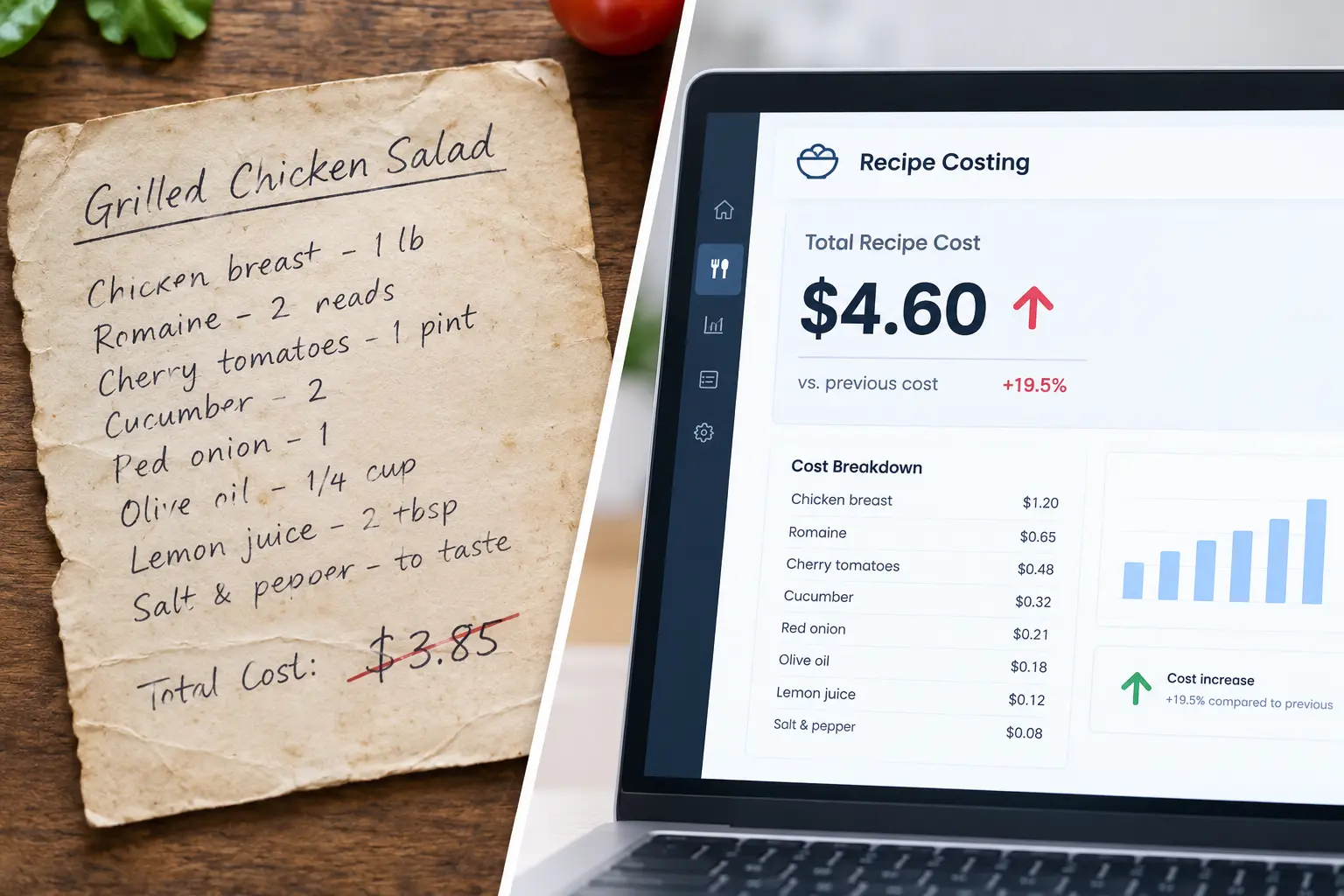
Picture this: you costed your signature burger at $3.85 back in January. Then beef went up. Then buns. Then the cheese supplier “adjusted” their pricing, and you didn’t even notice. Today that same burger costs you $4.60, but your menu price hasn’t budged. Ouch!
I’ve seen this happen in kitchens of every size, and it’s rarely a pricing mistake. It’s a data mistake. Your recipe costs were right once. They just aren’t right anymore.
Here’s the good news. You don’t have to re-cost every recipe by hand each time an invoice lands. In this guide, I’ll show you what happens to your recipe costs when vendor prices change, what it’s really costing you, and how live recipe costing keeps your plate costs and menu margins accurate.
1. What Happens to Recipe Costs When Vendor Prices Change?
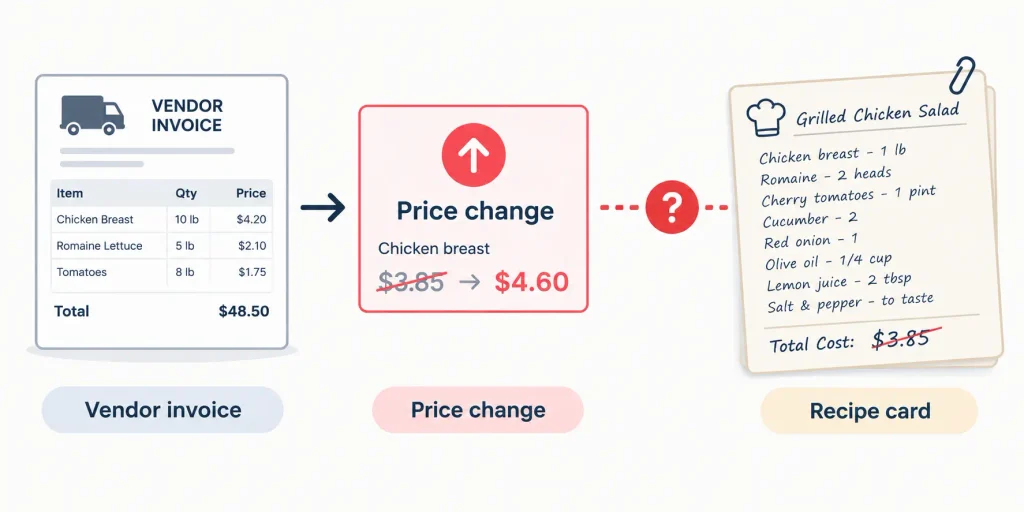
Every recipe is built from ingredients, and every ingredient has a price. When that price moves, the cost of every dish using it moves too. The problem is that most kitchens don’t see the change flow through.
Here’s what typically happens. A vendor raises the price of an ingredient. The invoice arrives, gets filed, and the recipe card still shows the old number. Nobody decided to ignore the increase. It just never reached the place where costs are calculated.
That’s the gap between “costed once” and “costed today.” The wider it gets, the less you can trust your numbers.
Common triggers include:
- Seasonal pricing: produce, seafood, and dairy swing throughout the year.
- Supply shocks: weather, shortages, and disruptions push prices up fast.
- Vendor surcharges: fuel, delivery, and minimum-order fees add up.
- Pack-size changes: the same product in a smaller case is a hidden price hike.
- Supplier switches: a new vendor means new prices, units, and yields.
It also helps to separate two ideas. Theoretical food cost is what your dishes should cost based on your recipes. Actual food cost is what you really spent. When recipe costs are outdated, theoretical cost is wrong from the start, and the comparison tells you nothing.
2. Why Static Recipe Costing Quietly Fails
Static costing works on the day you build it. After that, it starts aging.
Spreadsheets and one-time costing snapshots go stale fast. Someone has to remember to update them, and in a busy kitchen, that someone is also running the line, placing orders, and putting out fires. Manual updates are slow, error-prone, and easy to skip.
A few things make it worse:
- Buried invoice changes: a 6% increase on one line of a 40-line invoice is easy to miss.
- Yield and trim mismatches: if you cost a whole tenderloin but serve trimmed portions, your plate cost is too low before prices even move.
- Unit-of-measure errors: buying by the case, costing by the ounce, and converting incorrectly is a classic trap.
- Sub-recipes: a sauce, dough, or stock used in ten dishes means one stale number corrupts ten plate costs.
Small errors don’t stay small. They multiply across your menu.
3. The Real Cost of Outdated Recipe Costs
Outdated costs don’t announce themselves. They show up as a slow leak in your margins.
Take the burger from earlier. Say it sells for $13.00.
- At $3.85, your plate cost is about 29.6%.
- At $4.60, it’s about 35.4%.
That’s $0.75 lost on every burger. If you sell 100 a week, that’s $75 weekly, or roughly $975 over a 13-week quarter, from one dish. Now imagine that across your whole menu.
The damage goes beyond one dish:
- Eroded gross margin on your best sellers.
- Underpriced items that look profitable but aren’t, which are hidden loss leaders.
- Inaccurate food cost percentage, which makes your P&L misleading.
- Bad decisions on menu engineering, promotions, and catering quotes.
You can’t manage a margin you can’t see.
4. Warning Signs Your Recipe Costs Are Out of Date
Not sure if this is happening to you? Look for these red flags:
- Food cost percentage creeps up with no obvious explanation.
- Theoretical and actual food cost keep drifting apart.
- Costing sheets have old dates or missing ingredients.
- Chefs and managers guess at plate costs instead of knowing them.
- Invoice totals regularly surprise you.
If two or more sound familiar, your costs are probably stale. Don’t panic. This is common, and it’s fixable.
5. What Is Live Recipe Costing?
Live recipe costing means your recipe costs update automatically when ingredient prices change. Instead of re-costing by hand, your recipes stay connected to your current vendor prices.
It typically works by linking three things: your invoices, your vendor price lists, and your recipe database. When a new price comes in, every recipe using that ingredient recalculates, including sub-recipes and the dishes built on them.
Compare that with periodic re-costing, where you sit down once a quarter and update everything. Periodic costing tells you what your costs were. Live costing tells you what they are now.
Kitchens that benefit most include:
- Independent restaurants with tight margins
- Multi-unit groups that need consistency across locations
- Caterers quoting jobs on short notice
- Bakeries and commissaries with complex, ingredient-heavy recipes
6. How Live Recipe Costing Works Step by Step
Here’s the process, start to finish.
Step 1: Centralize ingredients, units, and vendor items. Build one clean list of what you buy, who you buy it from, and in what units. Messy data in means messy costs out.
Step 2: Build recipes with accurate yields and sub-recipes. Enter every ingredient, quantity, and yield loss. If you need a refresher on the math behind a single dish, this guide on how to calculate the food cost of a recipe breaks it down clearly.
Step 3: Capture price changes from invoices and vendor data. This is the heart of live costing. Prices flow in from what you’re actually paying, not what you remember paying.
Step 4: Auto-recalculate plate cost and margin. Every affected recipe updates instantly, with no spreadsheet hunting.
Step 5: Alert the team when an item crosses a margin threshold. Set a target, such as a maximum food cost percentage for each category, and get flagged when a dish slips.
7. Key Features to Look for in Live Recipe Costing Software
Not every tool does this well. Here’s what to look for:
- Invoice-driven price updates, so you aren’t typing prices in by hand.
- Multi-vendor and unit-conversion support, because real kitchens buy from several suppliers in several units.
- Sub-recipe and yield handling, so sauces, doughs, and trim loss are counted correctly.
- Margin alerts and price-change reports, so you see problems before they hit your P&L.
- Reporting by menu item, category, and location.
- Integrations with your POS, inventory, and accounting systems.
If a tool can’t handle sub-recipes and units cleanly, keep looking. Those two are where most costing errors begin. Want to see how two popular tools handle price changes and recipe costs? Our Genius vs. xtraCHEF breakdown compares them side by side.
8. How to Update Recipe Costs When Vendor Prices Change (Pricing, Portioning, Sourcing)
Seeing the change is half the battle. The other half is deciding what to do about it.
You have three main levers:
- Pricing: raise menu prices on affected items, ideally the ones with low margins and high demand. For a full framework on pricing every dish, see this menu costing guide.
- Portioning: adjust portion sizes carefully, without hurting perceived value.
- Sourcing: substitute ingredients, renegotiate with your vendor, or compare quotes side by side.
You don’t have to pull every lever every time. Sometimes a small price tweak on one item is enough. Sometimes a vendor switch saves more than any menu change. Good costing data tells you which move makes sense, and it turns purchasing into a strategic decision instead of a reaction.
9. Common Mistakes to Avoid
Even with the right tools, these traps catch people:
- Ignoring waste, trim, and yield loss. The cost on paper isn’t the cost on the plate.
- Costing only the big ingredients. Oils, spices, garnishes, and packaging add up.
- Not updating sub-recipes. One stale sauce skews every dish it touches.
- Treating costing as a one-time project. It’s an ongoing habit, not a task you finish.
- Disconnecting purchasing from recipe data. If your buyer and your chef use different numbers, you’ll both be wrong.
10. Getting Started: A Simple Rollout Plan
You don’t need to cost your whole menu on day one. Start small.
- Audit your top 10 to 20 menu items. These drive most of your revenue.
- Clean up your ingredient and vendor item list. Remove duplicates and fix units.
- Set margin targets by category. Appetizers, entrées, and desserts rarely share the same target.
- Establish a weekly review routine. Fifteen minutes on price changes and alerts is plenty.
- Track results over the first 30 to 90 days. Look for margin recovery and fewer surprises.
Momentum matters more than perfection. Get the top sellers right, then expand.
11. FAQs
How often should I update recipe costs?
Ideally every time a vendor price changes. With live recipe costing, that happens automatically. If you’re updating manually, review at least weekly for volatile items like proteins and produce.
How much does a vendor price increase affect my food cost percentage?
It depends on how much of a dish the ingredient makes up. In the burger example, a $0.75 plate cost increase on a $13.00 item moved food cost from about 29.6% to 35.4%. Ingredients that make up a large share of the plate have the biggest impact.
What’s the difference between recipe costing and menu costing?
Recipe costing calculates what a single dish costs to make. Menu costing looks at your whole menu, including pricing, margins, and profitability. Here’s a deeper look at recipe costing vs. menu costing.
Can I do live recipe costing in a spreadsheet?
You can approximate it, but it’s hard to maintain. Spreadsheets need manual price updates and break easily with unit conversions and sub-recipes. Software that pulls prices from invoices is more reliable.
How do I cost recipes with seasonal ingredients?
Use current vendor prices and review them often. For heavily seasonal items, consider setting alerts so you know when a price moves enough to affect margin, then adjust the menu price or substitute ingredients.
Conclusion
Recipe costs when vendor prices change don’t have to be a mystery. Vendor prices will keep moving. That’s not going to change. What can change is how quickly you see it and respond.
To recap: static costs go stale, stale costs hide margin leaks, and live recipe costing closes the gap by tying every invoice to every plate. Start small! Pick your top-selling dishes, update their costs this week, and watch what you find. I’m betting you’ll spot at least one item that’s costing you more than you thought.
Ready to stop guessing and start costing in real time? Explore live recipe costing with Genius Food Purchasing and take control of your margins today.