
Ou Features
Every Kitchen Cost, Accounted For.
One platform to buy, count, cost, and pay for everything that moves through your kitchen — so nothing slips past your margins unnoticed. Genius brings pricing, purchasing, inventory, and payroll into one system, so the number on the invoice and the number in your P&L are always telling the same story.

Why choose us
Why Choose Genius
Most kitchens run cost control across five disconnected tools: a vendor portal for pricing, a spreadsheet for recipe costing, a clipboard for inventory, an inbox for rebates, and a separate system for payroll. Genius replaces all five with one system that shares the same data, so a price change in one place updates everywhere it matters.
- One login instead of five separate tools to check every morning.
- Real prime cost visibility, with food and labor cost sitting side by side.
- Price and margin problems get caught the day they happen, not at month-end close.
- Built for multi-location groups, with rollup reporting across every site.
Everything included
Features
Seven tools, working off the same numbers. Explore each one below.
Price Comparison
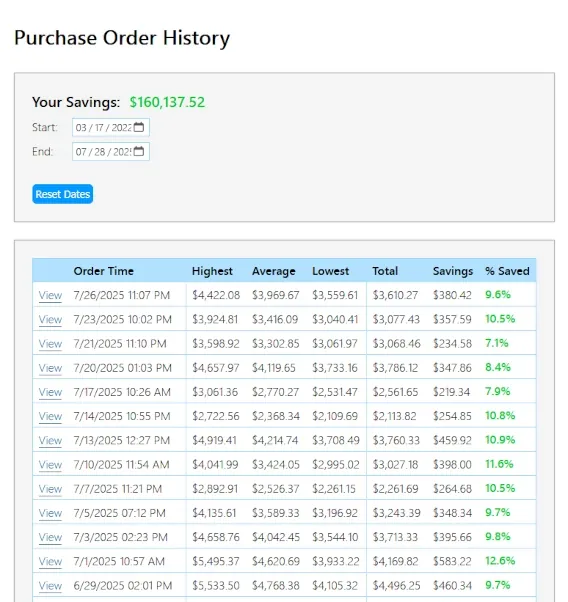
See every vendor’s price for the same ingredient side by side, refreshed with each new invoice. Spot the vendor charging more for the same case of tomatoes before the order goes out, not after the delivery arrives. Genius pulls pricing from every connected vendor automatically, so comparison shopping stops being a manual chore done once a quarter and becomes something that happens on every single order.
Procurement
Build, send, and approve purchase orders from one screen, synced to every vendor you order from. Set approval limits by role so a $40 produce order and a $4,000 protein order don’t move through the same gate. Chefs order what they need, managers approve what matters, and nothing gets placed twice or forgotten.
Cost Control
Get flagged the moment an invoice price drifts from what you agreed to pay a vendor. Set a tolerance per item and let the system watch every delivery, so price creep gets caught in the walk-in, not at month-end when it’s already eaten your margin. Every flagged line item includes the agreed price, the billed price, and the difference, so disputing it with a vendor takes minutes.
Recipe Costing
Cost every dish down to the gram, and watch the number move as ingredient prices change. Know your true food cost percentage on every menu item, not just an average across the whole menu. When a supplier raises the price of chicken, every recipe using chicken recalculates automatically, and any dish that’s crept past its target margin gets surfaced for review.
Rebates
Track vendor rebates automatically as qualifying orders come in, instead of chasing them through spreadsheets and vendor portals at quarter-end. See what you’re owed, what’s already been paid out, and which rebate programs you haven’t hit volume thresholds for yet, all in one place.
Inventory
Count stock from a phone in the walk-in or dry storage, and reconcile it against usage instantly. Variance reports show what should be on the shelf versus what’s actually there, item by item, so shrinkage and over-ordering get caught early instead of showing up as a mystery at the end of the month.
Payroll
Run kitchen and floor payroll without leaving the platform your costs already live in. Pull hours straight from your scheduling data and see labor cost sitting next to food cost, not in a separate system, so your real prime cost is always one screen away.
Who we are
Two worlds, one team.

Jim Lange
Founder & CEO
With 20+ years as a business owner and deep roots in the restaurant industry, Jim understands the daily pressures operators face. He built Genius from the ground up on firsthand insight and feedback from real restaurant owners.

Brandon Sawyer
CTO
A seasoned developer with 10+ years of experience, Brandon leads product development. Every line of code is crafted with the operator in mind: fast, intuitive and reliable.
Questions
Frequently Asked Questions
Do I need to switch vendors to use Genius?
No. Genius connects to the vendors you already order from and layers price visibility, approvals, and cost tracking on top of those relationships. You keep the vendors you trust; you gain visibility into what you’re actually paying them.
How long does setup take?
Most kitchens are placing their first purchase order inside a week. Recipe costing and full inventory counts typically take two to three weeks to fully populate, depending on how many items and recipes you’re bringing in.
Can Genius handle multiple locations?
Yes. Pricing, recipes, and inventory can be shared across locations or set independently per site, and cost reporting rolls up to a single view for anyone overseeing more than one kitchen.
What does it cost?
Pricing depends on the number of locations and which modules you turn on. Book a demo and we’ll walk through a plan sized to your kitchen.
Proof before you commit
See what you would save before you commit.
We run Genius against your real orders and show you every dollar it finds, in writing, before you decide anything.